---
title: "Understanding TTL in DNS: What Does TTL Mean in DNS?"
type: "post"
post_id: "25605"
slug: "what-does-ttl-mean-in-dns"
canonical: "https://easydns.com/blog/2024/10/24/what-does-ttl-mean-in-dns/"
markdown_url: "https://easydns.com/blog/2024/10/24/what-does-ttl-mean-in-dns.md"
json_url: "https://easydns.com/blog/2024/10/24/what-does-ttl-mean-in-dns.json"
txt_url: "https://easydns.com/blog/2024/10/24/what-does-ttl-mean-in-dns.txt"
published: "2024-10-24T18:33:51+00:00"
modified: "2024-11-13T18:14:41+00:00"
author: "Clint Butler"
categories:
- "Howto's and Help"
tags:
site_name: "easyDNS"
publisher: ""
language: "en-US"
generator: "easyPress Markdown"
generator_version: "1.0.3"
---
The Domain Name System (DNS) is often referred to as the internet’s phonebook, translating human-readable domain names like www.example.com into IP addresses that computers use to identify each other on the network.
The most overlooked component of DNS, even among the technically adept, is the **Time to Live (TTL)** value. Understanding what TTL means and how it affects both your query counts and update times is essential for anyone managing a website or network.
A zone’s TTL influences [DNS performance](https://easydns.com/blog/2024/08/12/optimizing-dns-performance-ttl-strategies-to-reduce-query-count-on-a-dns-zone/), caching behavior, and how quickly changes propagate across the internet.

**What Does TTL Mean in DNS?
----------------------------
**Time to Live (TTL)** in DNS refers to the duration (in seconds) that a DNS record is cached by a DNS resolver or server before it needs to fetch a fresh copy from the authoritative nameserver. Essentially, TTL determines how long a resolver (the nameservers that *ask* questions about domains and hostnames) should store the information about a domain’s DNS records before querying the authoritative DNS (the nameservers that *answer* queries about zones they host) again.
### **Purpose of TTL in DNS Records
Without caching, resolvers would have to redo a query every time it needs to know the value of a given domain or hostname – imagine a webpage where there are a dozen embedded imaged, all anchored to the same image hosting server.
When rendering that page, the browser needs to lookup that image host, if there was no such thing as caching, it would have to look it up *every time*. It would slow the page rendering speed to a c-r-a-w-l.
So resolvers *cache* the answer to their DNS lookups, but they also need to know how long they can hang onto that old value for, in case it ever changes.
This is why we have TTLs:
- **Caching Efficiency**: Query caching reduces the number of queries sent to authoritative DNS servers by allowing intermediate [DNS servers](https://easydns.com/) to remember the responses for a set period, the TTL controls the length of that period.
- **Performance Enhancement**: By caching DNS records, TTL reduces latency for end-users, leading to faster website load times.
- **Load Reduction**: Decreases the workload on authoritative DNS servers by limiting the frequency of otherwise repetitive queries.
[](https://easydns.com/)
**How TTL Affects DNS Performance
---------------------------------
### **Impact on DNS Query Speed
When a DNS resolver has cached a DNS record, it can respond to queries more quickly than if it had to fetch the information from the authoritative server every time. This improves overall **DNS performance** and user experience.
### **Effect on DNS Propagation Time
**DNS propagation** refers to the time it takes for changes to a DNS record to be updated across all DNS servers worldwide. TTL directly affects this propagation time:
- **Lower TTL Values**: Lead to faster propagation but increase the number of queries to the authoritative DNS server.
- **Higher TTL Values**: Slow down propagation but reduce the load on DNS infrastructure.
**Common TTL Values and Their Uses
----------------------------------
### **Understanding TTL Units
If you look at a domain’s SOA record (Start-of-Authority) record (which you can edit in your control panel here), it breaks out into five separate fields:
- Serial
- Refresh
- Retry
- Expire
- **Minimum *Negative Cache***
The first three are for signalling between nameservers and we handle most of that under-the-hood so you shouldn’t need to worry about it.
The only ones you really care about is the **Expire** Interval and then last one.
#### SOA Expire Field
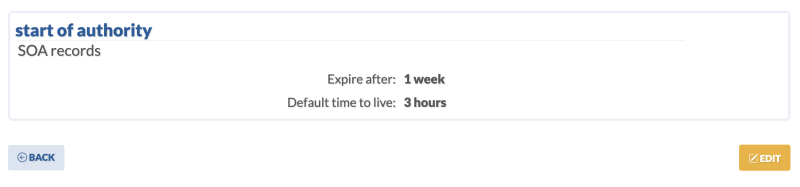
If something goes wrong with your primary nameservers (or even *all* of your authoritative nameservers), any resolvers who have your zone cached will *keep* it for the amount of time specified in the Expire field – so we like to go long here, 7 days, or even 10 days. We’ve seen some crazy values here.
As long as the age of the cache is lower than the value in this field, the resolvers will keep using these values *even if they know they’re supposed to refresh, but can’t* because there’s a problem with the authoritative nameservers.
Once this value elapses – the resolver drops the zone, because it decides the cached info is so old, it may be out of date. Hopefully any issues on the primary nameservers get resolved before this timeframe.
#### The Negative Cache Field
This *used to be* the main Time-To-Live setting – and probably 90% of techies still think this is your TTL. It isn’t, this is used to be the case, but it was changed to govern how long a nameserver should cache a *negative response* on a query.
The main TTL is now taken from the individual TTL value *of the SOA RR itself*.
If you’re eyes just glazed over, don’t worry about it. Just enter the value you want in the control panel and we take care of it:
**Configuring TTL in DNS Records
--------------------------------
### **Where to Find and Set TTL Values
TTL values are configured in your DNS management interface, provided by your [domain registrar](https://easydns.com/10-things-you-absolutely-must-know-before-you-register-a-domain-with-anyone/) or DNS [hosting service](https://easydns.com/dns/). Each DNS record type (A, AAAA, CNAME, MX, etc.) can have its own TTL setting.
**Scenarios Impacting TTL Choices
---------------------------------
### **Website Migrations
Before migrating a website to a new server, lowering the TTL (e.g., to 300 seconds) ensures that DNS changes propagate quickly, minimizing downtime.
### **DNS Record Updates
When updating DNS records, such as changing IP addresses, a lower TTL allows the new information to reach users faster.
### **High-Traffic Websites
For websites with high traffic, *increasing* your TTL values can reduce the load on DNS servers, enhancing stability. If you want to learn more about this, [see our article on minimizing your DNS query overages](https://easydns.com/blog/2024/08/12/optimizing-dns-performance-ttl-strategies-to-reduce-query-count-on-a-dns-zone/) through adjusting these values.
**Tools for Checking and Troubleshooting TTL
--------------------------------------------
**Using dig for DNS Queries
The dig command-line tool can display TTL values for DNS records:
$ dig example.com
```
; <<>> DiG 9.11.5-P4-5.1+deb10u11-Debian <<>> example.com
;; global options: +cmd
;; Got answer:
;; ->>HEADER<<- opcode: QUERY, status: NOERROR, id: 46231
;; flags: qr rd ra ad; QUERY: 1, ANSWER: 1, AUTHORITY: 0, ADDITIONAL: 1
;; OPT PSEUDOSECTION:
; EDNS: version: 0, flags:; udp: 1232
; COOKIE: ad0b757ab4637cd901000000671bc3e2349ba9b040f6af7b (good)
;; QUESTION SECTION:
;example.com. IN A
;; ANSWER SECTION:
example.com. 3595 IN A 93.184.215.14
;; Query time: 1 msec
;; SERVER: 64.68.199.53#53(64.68.199.53)
;; WHEN: Fri Oct 25 16:14:26 UTC 2024
;; MSG SIZE rcvd: 84
```
Look at the ANSWER SECTION where the response is listed, the TTL is the second field – and the value it’s showing is *how much time is left on the TTL.* Repeatedly running this dig command and seeing this value coming down confirms you are getting response from a resolver that is answering from it’s cache.
You could ask the authoritative nameserver directly:
```
$ dig easydns.net @dns1.easydns.com
;; ANSWER SECTION:
easydns.net. 600 IN A 64.68.200.48
```
### **Online DNS Lookup Tools
Web-based tools like [DNS checker websites](https://domainhelp.com) can also display TTL values without needing command-line access.
### **Common TTL-Related Issues
• **Stale Records**: High TTL values may cause outdated records to linger.
• **Increased Load**: Very low TTLs can increase the load on authoritative DNS servers due to more frequent queries.
**Advanced Topics
-----------------
### **TTL and Dynamic DNS (DynDNS TTL)
[Dynamic DNS services](https://easydns.com/dns/) update DNS records automatically when an IP address changes. TTL settings in DynDNS affect how quickly these changes propagate.
### **TTL in Reverse DNS Lookups
Reverse DNS translates IP addresses back to domain names. TTL settings here are important for services like email servers, where reverse DNS is used for spam prevention.
### **Fastest DNS Servers and TTL
Using the fastest DNS servers can improve DNS query times. However, TTL settings still dictate how long records are cached, affecting performance.
[](https://easydns.com/dns/)
**TTL and Security Considerations
---------------------------------
### **DNS Cache Poisoning
Long TTL values can make DNS cache poisoning more persistent, as malicious records remain cached longer.
### **Mitigating Security Risks
- **Regular Updates**: Keep DNS records updated and [monitor for unauthorized DNS changes](https://domainsure.com/services/).
- **Appropriate TTL Values**: Use TTL values that balance performance and security needs.
See Also:
---------
- [Optimizing DNS Performance: TTL Strategies to Reduce Query Count on a DNS Zone](https://easydns.com/blog/2024/08/12/optimizing-dns-performance-ttl-strategies-to-reduce-query-count-on-a-dns-zone/)
Supplement Content:
— What is TTL in DNS?
-------------------
Time to Live (TTL) in the Domain Name System (DNS) is the time a DNS record stays cached by a server. This value decides how long a DNS resolver can store a response before it must get fresh data. Domain administrators use TTL to manage how DNS records cache, impacting how fast changes to domain settings spread across the internet.
Importance of TTL in DNS settings
---------------------------------
Setting the right TTL in DNS settings is key for efficient caching and timely updates of DNS records. A good TTL helps servers cache DNS records effectively, reducing traffic on authoritative DNS servers and improving response times. Balancing server load and up-to-date addressing information is important. Choosing the right TTL maintains effective DNS operations and improves domain name resolution reliability.
How does TTL affect DNS caching?
--------------------------------
TTL greatly impacts DNS caching by setting how long DNS resolvers keep a record before needing updated information. When a resolver caches a record based on its TTL, it can quickly answer requests without querying the main server, speeding up DNS resolution. A high TTL might cause outdated records, delaying updates in the DNS network. On the other hand, a low TTL causes frequent cache updates, which may increase the load on DNS servers but keeps data current.
Differences between low and high TTL values
-------------------------------------------
Choosing between low and high TTL values affects DNS records and caching:
- **Low TTL Values:**
- Allow quick updates to DNS changes.
- Provide current information quickly.
- May result in increased server load due to frequent cache updates.
- **High TTL Values:**
- Lower server load with less frequent cache updates.
- Might slow down the spread of DNS changes.
- Keep information longer, which could delay updates.
Picking the right TTL depends on what your domain’s DNS management needs, balancing the need for current records with server performance.
How Does TTL Influence DNS Performance?
---------------------------------------
### Impact on DNS Resolution Speed
Time-to-live (TTL) significantly affects DNS resolution speed. When a DNS query occurs, the DNS server fetches the domain name’s IP address by checking various DNS records. The TTL in these records determines how long they stay in the DNS cache before another authoritative query is needed. A short TTL can refresh data quickly but may increase query traffic to servers. In contrast, a long TTL boosts resolution speed by allowing cached responses more often, reducing the load on authoritative servers and improving performance.
### Managing TTL for Optimal Performance
Managing TTL settings in DNS records is crucial for system performance. Best practices involve setting TTL values that balance efficient caching with timely updates to DNS records. Here are some strategies:
- **Assess Needs**: Choose the right TTL value based on your system’s requirements and update frequency.
- **Standardize Configuration**: Use consistent TTL values across similar DNS records for easier management.
- **Optimize for Traffic Patterns**: Adjust TTL based on observed query patterns to reduce unnecessary DNS queries and improve efficiency.
- **Regular Monitoring**: Monitor DNS performance regularly to make necessary adjustments to TTL values, ensuring optimal resolution speed.
### Relationship Between TTL and DNS Propagation
TTL directly impacts how fast DNS changes spread across the Internet. When DNS records, like IP addresses, change, they must propagate from authoritative servers to local caches. A low TTL allows quick propagation, updating DNS records swiftly across systems. However, too low a TTL can cause frequent cache expiration, leading to repeated queries to authoritative servers and potential delays. Balancing TTL values helps ensure timely DNS propagation, keeping updated records accessible while maintaining good cache performance.
For more insights on managing DNS efficiently, explore our [DNS Management Best Practices](#) guide available on easyDNS for further learning.
Best Practices for Configuring TTL Settings
-------------------------------------------
### Factors to Consider When Setting TTL Values
When setting Time To Live (TTL) values in your DNS records, it’s important to ensure the network’s performance meets your domain’s needs. The TTL value determines how long a DNS record is cached on a server or device. Consider these factors:
- **Caching Needs**: Decide how often your DNS might change. For environments that change frequently, shorter TTLs allow faster updates but might increase load on authoritative servers.
- **Server Load**: Lower TTLs can lead to more queries to the DNS server, which may increase the server’s load. Balance TTL settings to avoid overwhelming the server while ensuring effective caching.
- **Network Latency and Traffic**: Think about the distance between users and DNS servers. Shorter TTL values can help reduce latency by ensuring records are current but might also result in more DNS traffic.
- **Control Over DNS Records**: Make sure TTL values fit your control needs over DNS records, especially if frequent updates to DNS configurations are expected.
### Guidelines for Adjusting TTL During DNS Changes
Adjusting TTL settings during DNS changes is key to smooth propagation throughout the Domain Name System (DNS). Follow these guidelines:
1. **Prepare Before Changes**: Reduce the TTL value temporarily before making DNS changes. This helps DNS updates spread quickly across the internet.
2. **Track DNS Propagation**: After updating DNS records, use tools to monitor propagation and confirm changes are distributed worldwide.
3. **Restore After Updates**: Once the DNS changes are fully propagated, increase the TTL value again to lower the query load on servers and improve caching.
4. **Review Regularly**: Regularly check TTL settings as part of routine DNS maintenance to keep up with changing requirements.
### Common Mistakes to Avoid with TTL Settings
To maintain DNS security and efficiency, avoid these common mistakes with TTL settings:
- **Inconsistent TTL Settings**: Keep TTL values consistent across related DNS records to avoid mismatches during changes.
- **Ignoring Security Risks**: Avoid setting very low TTLs unless necessary, as they can expose you to DNS spoofing attacks.
- **Overloading Servers**: Don’t set TTLs that cause high query loads on authoritative servers due to frequent expirations.
- **Complex DNS Configurations**: Ensure TTL logic matches your domain’s needs, avoiding complex setups that disrupt smooth DNS operations.
By following these best practices, individuals and professionals can use DNS services effectively, ensuring a seamless and secure domain management experience. For more insights on DNS configuration, visit our [DNS Management Solutions](#) page.
The Role of TTL in Network Security
-----------------------------------
### How TTL Affects DNS Security Protocols
Time To Live (TTL) is important for DNS security protocols. TTL, part of DNS records, sets how long a DNS server can store data before it fetches new data from core DNS servers. This time frame affects how often updates and changes are shared over the internet.
Carefully managing TTL settings helps improve security. Shorter TTLs mean more frequent updates, reducing stale data risks. Longer TTLs boost performance by easing the load on DNS servers but might be risky if cached data is vulnerable.
Finding the right balance between security and network performance is key. Setting the right TTL values ensures DNS records update regularly, lowering potential security risks.
### Strategies for Using TTL to Prevent DNS Cache Poisoning
DNS cache poisoning attacks use the DNS server’s caching to mislead users to fake sites. Adjusting TTL can help counter these threats.
- **Set Shorter TTLs**: Shorter TTLs mean cached data refreshes more often, reducing opportunities for attackers to add false DNS records.
- **Use Secure DNS Protocols**: Enhance TTL settings with secure protocols like DNSSEC. This adds authentication to DNS replies, making it tougher for attackers to alter DNS records.
- **Regular DNS Audits**: Regularly check DNS settings and TTL values to ensure defenses are current against new threats.
By using these tactics, organizations can stop DNS cache poisoning, keeping the network safe from attacks.
### Understanding the Balance Between TTL and Security Measures
Balancing TTL settings with security measures is key for DNS system performance and integrity. TTL helps with caching but must fit broader security needs.
- **Check Network Needs**: Look at your network’s specific needs. High-traffic services might need shorter TTLs for quick DNS updates, while static sites might work with longer TTLs.
- **Watch Caching Performance**: Examine caching performance to ensure current TTL settings meet speed and reliability needs.
- **Adapt to Security Threats**: Stay aware of new threats and adjust TTL settings to strengthen security without affecting service availability.
Balancing TTL settings with security measures ensures DNS servers deliver fast access to correct data while limiting attack risks.
Engage with our community at easyDNS to learn more about configuring TTL and improving your network security.
Exploring TTL Across Different DNS Services
-------------------------------------------
### Comparing TTL Configurations in Various DNS Providers
In the domain name system, understanding Time-to-Live (TTL) settings is key for optimizing DNS services. Different DNS providers like Google, Cloudflare, Dyn, and GoDaddy have various TTL configurations that influence how DNS servers perform and manage DNS records. These configurations impact cloud infrastructure by affecting DNS propagation and response times. Choosing the right TTL setting depends on the specific needs of your infrastructure, whether managing a single domain or a complex multi-cloud setup.
### Case Studies: Effective TTL Management in Real-World Scenarios
Case studies give helpful insights into effective TTL management in dynamic DNS environments. By examining real-world examples, we can see the connection between TTL and DNS resolution, caching, and load balancing. For example, some organizations use DNS zone configurations to get faster DNS lookup times and improve DNS propagation. These case studies show the importance of setting the right TTL to reduce latency and boost domain performance in various situations.
### Future Trends in TTL and DNS Technology
Looking ahead, TTL and DNS technology will likely see many innovations. The use of IPv6, DNS over TLS, and other security improvements suggests a move toward a safer internet. Advances in cloud computing and content delivery networks (CDNs) are also changing DNS server structures. Additionally, using machine learning and automation in data management could change how TTL is configured, leading to smarter DNS solutions. Keeping up with these trends is important for staying competitive in the changing world of DNS services.
For more information on how easyDNS can help optimize your TTL settings across different DNS providers, [learn more here](#).
### FAQs
**What is TTL in DNS?**
TTL, or Time-to-Live, is a value in a DNS record that tells how long the record is cached by DNS servers and clients.
**How do different TTL settings affect DNS performance?**
Shorter TTLs mean more frequent updates and improved accuracy but may slow loading times due to more lookups. Longer TTLs reduce load but might serve outdated information.
**Why are case studies important in understanding TTL management?**
They offer practical insights into TTL strategies, showing the benefits and challenges faced in real-world implementations.
**What future trends should be considered when planning DNS strategies?**
Trends like increasing IPv6 use, better security protocols such as DNS over TLS, and automation and machine learning integration are key for developing strong DNS strategies.
—
FAQs:
—
**What is DNS TTL and why is it important?**
DNS TTL, or Time to Live, is an essential setting in DNS records that determines how long a DNS record is cached by servers. It affects how quickly changes are recognized and can influence failover, caching, and load balancing.
**How does the TTL setting in an SOA record affect my domain?**
The TTL in an SOA (Start of Authority) record indicates how often DNS information is refreshed. A shorter TTL updates DNS info faster, which is vital for infrastructure changes. A longer TTL can lower the DNS query load but might delay updates.
**Why do all DNS records have a TTL attribute?**
Each DNS record includes a TTL attribute to control how long data is cached before refreshing. This helps in efficient resource use and reduces the risk of DNS spoofing, which enhances security.
**What role does TTL play in DNS caching and resolution?**
TTL sets the duration for which DNS responses are stored in caches. Proper TTL values can improve network performance by reducing unnecessary queries and speeding up page loading times.
**Can changing TTL values improve DNS failover response times?**
Yes, lowering TTL values can enhance DNS failover efficiency by allowing quicker change propagation during failover. This reduces downtime and ensures services remain accessible.
**How do tools like nslookup help in understanding TTL settings?**
Tools such as nslookup show current TTL values for domain records, aiding in DNS behavior analysis and troubleshooting. Proper TTL settings help in DDoS protection and load balancing.
**Is TTL relevant when using CDN services for static content delivery?**
Yes, CDNs use TTL settings to decide how long content remains cached at edge locations. This affects access speed and network usage, with optimized TTL improving delivery efficiency.
**How does DNS TTL impact SEO and website performance?**
Optimized TTL settings help recognize DNS changes quickly, minimizing downtime and improving user experience. This boosts SEO rankings and increases search result visibility.
—
Bullet Points
—
Key Insights
------------
- Understanding DNS TTL (Time to Live) is vital; it defines how long records remain cached. It’s a time interval, not a fixed date.
- The SOA record of a domain includes a field that sets the default TTL for all DNS records, impacting caching behavior.
- DNS over TLS increases security by encrypting DNS queries, crucial in modern cloud networks and communication protocols.
- Recursive DNS servers help resolve queries, while tools like nslookup and dig provide insights into DNS configurations.
- PremiumDNS services offer features like DDoS protection and enhanced DNS visibility, critical for businesses with high traffic.
- Knowing the file format and syntax of zone files is important for managing DNS records, including CNAME and MX records.
- Providers like DigiCert and Constellix offer strong DNS hosting solutions, often integrating with WordPress and cloud platforms.
- DDoS attacks are a serious threat; strategies like traffic analysis, packet filtering, and dynamic caching are key for mitigation.
- For those managing DNS on platforms like cPanel or Plesk, familiarity with terms like hostname, SOA, and authoritative DNS is essential.
- Explore our blog or knowledge base for detailed articles on DNS concepts, including IPv4/IPv6, DNS caching, and server management.
—