---
title: "DOS Attacks and DNS: How to Stay Up If Your DNS Provider goes DOWN"
type: "post"
post_id: "784"
slug: "dos-attacks-and-dns-how-to-stay-up-if-your-dns-provider-goes-down"
canonical: "https://easydns.com/blog/2010/08/19/dos-attacks-and-dns-how-to-stay-up-if-your-dns-provider-goes-down/"
markdown_url: "https://easydns.com/blog/2010/08/19/dos-attacks-and-dns-how-to-stay-up-if-your-dns-provider-goes-down.md"
json_url: "https://easydns.com/blog/2010/08/19/dos-attacks-and-dns-how-to-stay-up-if-your-dns-provider-goes-down.json"
txt_url: "https://easydns.com/blog/2010/08/19/dos-attacks-and-dns-how-to-stay-up-if-your-dns-provider-goes-down.txt"
published: "2010-08-19T15:49:29+00:00"
modified: "2024-11-13T18:15:02+00:00"
author: "Mark E. Jeftovic"
categories:
- "Of Interest"
tags:
site_name: "easyDNS"
publisher: ""
language: "en-US"
generator: "easyPress Markdown"
generator_version: "1.0.3"
---
*[](https://easydns.com/wp-content/uploads/2010/08/mushroom.jpg)\[ The original article was a bit “wordy” and appears in its entirety after the page break. \]*
Nameservers and DNS services are one of the most popular attack vectors for Denial of Service Attacks. Since we wrote the original article, the types of attacks against DNS infrastructure have since bifurcated into two distinct types.
There are basically two reasons why your DNS servers may be attacked:
1. **To take you down.** If not you, then to take down somebody else using the same nameservers you are. So for example, an attack may be directed against the nameservers for a specific vendor, like a DNS provider, a domain registrar, a web hosting provider, an ISP or anybody else hosting multiple domains on behalf of numerous clients. Often times if the attack is successful, the damage goes beyond the target, some or all of the other domains using the same vendor will be impacted
2. **Amplification and reflection attacks:** On the surface similar to above, in that the attack will affect one or more specific vendors, but they differ at the point of the target, which is someplace else entirely. In these attacks the vendors nameserver infrastructure is being leveraged to attack somebody else. It can still affect your vendor and inflict widespread collateral damage, but perhaps more pernicious because neither you nor anybody else sharing the same vendor is the target.
In either case, if your DNS solution gets hit with either of these, you’re the one who suffers the impact if they can’t fully mitigate the attack.
There is a magic bullet to avoid this, and you can ensure you will always have functional DNS no matter what happens to any specific vendor.
That magic bullet is this:
**Use Multiple DNS Solutions**
------------------------------
As we never tire of saying: All DNS Solutions, regardless of how much redundancy, how much mitigation gear, how many POPs worldwide, whatever, they are still a SPOF unto themselves. Even us. Maybe something new comes along, like NTP reflection and suddenly 300 Gb/Sec attacks start happening, or maybe instead of a DDOS the core routers meltdown, or maybe some CXO pulls a Marlon Brando in Apocalypse Now and just totally quits the program, you just never know. A lot of companies have redundancy at every level – from power supplies right on up to datacenters, *except* for their nameservers and DNS. It’s just a blind spot in so many cases until the Black Swan event occurs.
So if you absolutely, positively have to have 100% DNS availability all the time, you must:
- Use multiple DNS providers or solutions
- Have a coherent methodology for syndicating your zones across those solutions
- Be able to track the health of each component of your “DNS mosaic” (I just made that up)
- Have the ability to switch / enable or disable components as required
and, the one piece which all of the above hinges on, usually the one part you usually *cannot do* once “The Event” has started is to
- Have it all setup in advance.
*( We have a system which actually automates all of this, called [**Proactive Nameservers**](https://www.proactivenameservers.com), if you are interested in our whitepaper on that, enter your email address below )*
\[mc4wp\_form id=”14414″\]
In general terms however, what follows are the methods you employ to make all this happen and thus guarantee that you have DNS availability 100% of the time, whether you’re with easyDNS, somebody else or doing it all yourself, and even if you are managing DNS on behalf of other downstream users.
**Hot Spares / Warm Spares / Mixed Delegations**
------------------------------------------------
Step one is to simply have at the very least, one or two out-of-band nameservers somewhere that are already configured to host your zones (warm spare), or even better, is always up-to-date (hot spare). You can do this as simply as adding one or more external nameserver IPs to your master nameserver configs, allowing them to mirror from your master and that they receive NOTIFY packets whenever you update your zone (also-notify).
In bind it’s as easy as this:
```
zone "example.com" {
type master;
file "example.com.zone";
masters {
10.2.1.33;
};
allow-transfer { 192.168.179.248; 192.168.179.249; };
also-notify { 192.168.179.248; 192.168.179.249; };
};
```
and most DNS providers allow you to add third party nameservers. In the easyDNS control panel you just add them under the **External** or **Integrations** tab in your domain administration module:[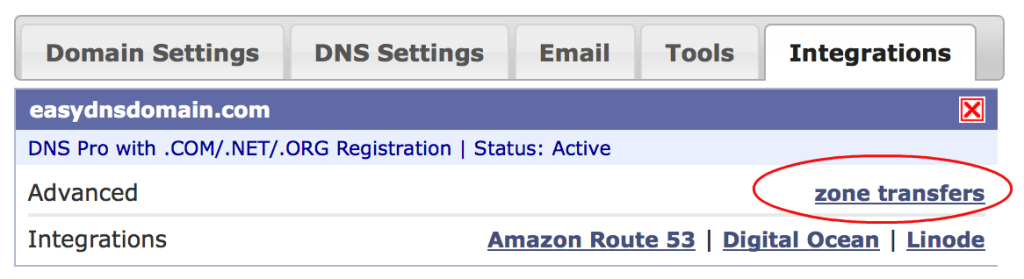](https://easydns.com/wp-content/uploads/2010/08/easy_integrations.png)
\[ On easyDNS we also support more robust integrations, for example you can configure your zones to automatically export (or import) your DNS settings on Amazon’s Route 53 DNS. You don’t even need your own AWS account to use it if you go with our[ fully managed option](https://easyroute53.com/managed.php). Hooks into the Linode and Digital Ocean DNS API are also in beta.\]
**Use DNS Anycast**
-------------------
IP Anycast is when a single IP address actually equates to multiple POPs distributed across the world (geographic diversity) and (ideally) multiple transit providers (network diversity). On it’s own, anycast will not mitigate a DDoS attack aside from helping diffuse the attack. If you have enough POPs than sometimes the hostile traffic gets spread thin enough that not all of them fall over.
Also, sometimes anycast can mean the difference between a global and localized outage. Say for example a lot of the hostile traffic is originating from one area (I dunno, maybe… China? Just as an example) and you have a POP near there (one that doesn’t get null routed or it’s BGP announcements dropped) during the attack, even if it does fall over, it will act as a “sinkhole” for the attack traffic – pulling it away from your *other* global POPs. It means a localized outage (users in that region perceive you as having gone dark) versus a global one. As we noted in the original article “some users may experience localized outages” is a better outcome than “everything is down hard”.
**Put your nameservers in Realtime TLDs**
-----------------------------------------
Most serious Top Level Domains update their TLD zones in realtime. (Alas, being based in Canada, .CA isn’t one of them, it only updates hourly). This is critical if you are going to add or modify your domain’s nameserver delegation to bring in your hot spares or remove a nameserver that has failed.
Choose your nameservers accordingly: .com, .net, .org, .biz, .info all update in realtime so once you modify your delegation it’s live across the internet in seconds.
**You Can Round-Robin a Nameserver Record**
-------------------------------------------
It’s true. We tried it in the past, it’s nowhere close to as effective as DNS anycast, but in a DDoS situation, anything you can do to diffuse the attack can help.
**Separate Your Nameservers From Everything Else**
--------------------------------------------------
Don’t have your nameservers inside the same net blocks as your other core infrastructure like database clusters, mail servers, et al. Because when you’re upstream null routes your nameservers you want to be able to still have come communications and other functionality available to you (which it will be, once you activate your backup nameservers, right?) If everything is inside the same net block that has been null routed or had its advertisements dropped, you’re totally gone.
**Decide on Active / Active or Active / Passive**
-------------------------------------------------
From High Availability parlance this means do you have your “Plan B” DNS option configured, ready to go, but not live in your active delegation? Or do you run your multiple DNS configurations all the time. Your own circumstances will be your guide.
Perhaps your main DNS is anycast, but your Plan B is unicast, you probably don’t want to run active / active because your Plan B will dilute the optimization and performance gains that you are getting from your anycast deployment.
**Conclusion**
--------------
The basic gist is to take a similar approach to nameservers and DNS as you would any other High Availability component of your IT infrastructure:
- Treat every DNS component, be it a vendor, data centre or cloud provider, as a discrete, logical unit
- Stack up multiple “units”, that are separate from each other
- Keep them configured, ready and hopefully in-sync with your current zone data
- Have the ability to activate them when the S hits the F, or else, just run them all, all the time.
Further Reading
---------------
- About[ Proactive Nameservers (hot swappable nameservers, or failover at the nameserver level)](https://proactivenameservers.com)
The Original Article Follows
----------------------------
*\[ Note: since publishing this article we have since created and deployed [Proactive Nameservers](https://www.proactivenameservers.com) (basically failover at the nameserver level) which automates some of the concepts outlined in this post as well as [easyRoute53](https://www.easyRoute53.com), which provides seamless integration for mirroring your DNS settings to Amazon’s Route 53 DNS \]*
Greetings from St. Lucia, where I’m here with the family for an end-of-summer vacation. I wanted to post about this topic before I left but I didn’t get to it, but [this article over at CircleID](https://www.circleid.com/posts/an_attack_on_dns_is_an_attack_on_the_internet/) reminded me. The article discusses the ramifications and effects of the large, possibly record-setting DOS attack against DNSMadeEasy last weekend. (To clarify: DNSMadeEasy is a separate company, unrelated to easyDNS)
The article states “An attack on DNS is an attack on The Internet” and this much is true. As we always quip around here, “DNS is something nobody notices until it stops working”.
I have to admit that in the early days of easyDNS I was **oblivious** to the possibility of DOS attacks. It simply never occurred to me. We were able to proclaim 100% DNS uptime since launching in1998 for a glorious 5 years and then on April 14th, 2003, it all ended as we got hit with a DOS that pancaked all four single-node nameservers and every domain on the system went dark for about 75 minutes. I nearly had a nervous breakdown, and then over the summer I thought long and hard about the ramifications and at the time surmised that the DNS hosting model was doomed.
Then we started looking at DNS anycasting but it took us another 5 years to get there. In the meantime we had another outage from another DOS: about an hour on Sept. 14/2005. We added Prolexic DDoS mitigation within weeks of that attack and are happy to report we haven’t had an outage since.
In the intervening years we also moved ourselves to a [DNS Anycast architecture](https://easyurl.net/WIKI/Anycast). While it is significantly harder to bring down an anycast architecture with a DOS attack, it can still happen. Usually instead of a complete and utter outage, you get “regional outages”, which is basically a euphemism to deflect assertions of downtime: “Some users may experience regional outages….like North America and Europe” (credit to Steven Job for that bit of humour).
Some DNS Providers guarantee you that they will never go down and assert 100% DNS uptime in face of prior DOS attacks. In reality, every single DNS provider in existence for more than 5 years has had downtime. If the DOS attack that hit DNSMadeEasy last week really was 40 or 50 GIGS, and if it would have hit us, I hesitate to say “we would have stayed up”. In 2006 we got hit with an attack that was 20 to 25 gigs, and we didn’t go down *completely (*“Some customers may have experienced regional outages”), but we sure felt it. Prolexic withstood the attacks and at the end of it we had to write a few enormous cheques to our providers to cover the bandwidth.
But I have long since backed away from my 2003 trepidations that the centralized DNS hosting model was doomed, for a few reasons:
1. DNS Anycast changes the game and drastically raises the bar for a DOS attack so that even if the resources can be mustered to do it, the duration of an outage is usually decreased as more numerous network carriers become aware of the problem and act to corral it.
2. DDoS Mitigation strategies have also improved. These days I think we are pretty well under a continuous state of low intensity DOS attack in one form or another. By low intensity I mean it doesn’t bring us down anymore, but these attacks are about 10 to 20 times more powerful than the 2003 attack that did us in, so:
3. The DOS attacks that DNS providers routinely mitigate every day would probably level many non-professional, non-dedicated DNS setups.
4. The other benefits to using an specialized DNS hosting provider outweigh the isolated risks of DOS attacks. A good example of this is DNS Anycast: the DNS best practice that is simply not-viable for many organizations to implement on their own. Commercial DNS providers make viable through their economies of scale.
But this is the internet. If you elect to take part in it, there are certain unpleasant realities that will come home to roost. Like if you own a domain name, sooner or later it’ll get joe-jobbed in a spam mailout. Eventually you will get caught in the crossfire of a DOS attack against some target that has nothing to do with you but it’s big enough to mess up one of your infrastructure suppliers. Like an empty bottle thrown at random into a crowd.
On the DNS side of things there are a few steps you can take to either not go down, even if your DNS provider does, or to make any impact minimal.
1. Use a DNS provider that allows third-party zone transfers. Either one that lets your slave your DNS zone from a primary nameserver outside of their own system (basically using a DNS provider as secondary DNS), or one that lets you designate other nameservers outside their system that can slave your DNS zone from it. Ideally, both.
2. Use two DNS providers. If you have the ability to setup point #1 above with multiple DNS providers, then you are pretty redundant right there. I got an email from a large web services company after the DNSMadeEasy DOS who uses both theirs and our services. He said they experienced no downtime and using two DNS providers was still a lot less expensive than their previous setup.
3. Or, just use any third party nameserver, even one of your own. Have it slave your zone from your DNS host (or have your DNS host slave from it). Unless **you** are the actual target of the DOS, then, like a jet that can fly as long as one engine is firing, you’ll be fine for the brief time your DNS provider may be down (or experiencing regional outages).
Being connected to the internet has varying degrees of importance to different organizations. For some, no downtime is acceptable (i.e. for DNS providers or web hosts, it’s very very bad). Other organizations take a couple years to notice that their domain name expired.
Depending on the seriousness of your web presence you may want to also consider additional measures and be aware of a few things.
- Many Top-Level Domains (.com, .net, .org, .biz and .info) make modifications in near realtime. People may be accustomed to things like nameserver delegation modifications to take a day to kick in. In fact a lot of user-interface verbiage probably still says as much (“please allow 24 to 48 hours for your nameserver delegation to take effect”). In these TLDs it’s closer to 3 to 5 minutes. Use that. The bad guys (spammers, botnets, etc) “fast-flux” their nameservers all the time to thwart tracing and reporting. It’s a tactic you can take back from the black-hats and you can fast-flux your nameservers to provide a moving target in a DOS situation.
- Warm spares: have your DNS mirrored on third party nameservers, *but do not add them to your nameserver delegation.* If your DNS provider goes down, you then temporarily swap in your warm spares.
- For web hosts or other infrastructure suppliers that run DNS for their clients: do the above, except when you need to make a switch to your warm spares, you change the glue record for your nameservers: this way you do not need to make changes to each customer domain’s nameserver delegation. The caveat here is you tend to only buy time: if the DOS is targeting you and you change-up your nameserver glue, the DOS may eventually (or sooner) follow you to the new IPs. Having said that, you can keep doing this and you may be able to diffuse the attack.
- Another overlooked fact: you can round-robin a nameserver glue record. We’ve tried it and don’t find it near as effective as DNS anycast, but in a DOS situation, if you can add more warm spares to your nameserver glue records, then do it. Again, this diffuses the attack. “Regional outages” may indeed be a euphemism but it really is better than “everything is down hard”.
- Here’s one we learned the hard-way: don’t have your nameservers in the same netblocks as your web interface and data storage, especially if you provide infrastructure services. If your nameservers are going to get clobbered you at least want to be able to get email and maybe provide a modicum of critical services to your users, something you can’t do if your entire operation is within the same /24 that has been null routed by your upstream providers.
If I can perhaps add some comments to this theme: I would not wish a nameserver outage on any DNS provider. And you can believe me, when it happens, the people inside that company are tearing their hair out, suffering extreme mental anguish and pulling out all the stops to restore services. When I see a DNS provider taken out by a DOS attack and chatter on twitter, etc along the lines of “XYZDNS is down #fail #fail #fail” I want to thwap those people upside the head. Get a life. Do you think your DNS provider is out on the golf course while his business is being taken apart by a DOS?
While I am a businessman and we are a for-profit company, I do not relish gaining business at the expense of a DNS provider who’s down because of a DOS attack. I’d rather gain customers on price, service offerings, customer support, our good looks, anything but a competitor going down because of a DOS. I guess because I’ve been there, I know how it feels. (Not all DNS providers take this view, in fact some of them pounce with glee when the opportunity presents itself, firing up the telemarketing crew to cold call the fallen provider’s customers. If you’re a customer of ours you have perhaps received such a call in the past).
DOS attacks are criminal acts. Get pissed off at the criminals who undertake them, not the people who are on the front lines of having to deal with them. Use these tips to stay online regardless of who your DNS provider is. I’m not advocating you stop using your existing DNS provider, but rather you modify your tactics so that instead of your DNS host becoming your single DNS host, it becomes more of a “DNS infrastructure management” role, that you use to setup and maintain multiple DNS structures (combining in-band nameservers from your DNS host with out-of-band nameservers outside their cloud), and warm spares.
Update (Jan 08/2012):
---------------------
Since we posted this, we have since rolled out easyRoute53, a management UI for Amazon AWS Route53 DNS. We heard back from a few members after the most recent DDoS attack (unfortunately, against us), that they were able to use this to export their DNS to Route53 and add or switch to Route53 for the duration of the attack. See [easyRoute53.com](https://www.easyRoute53.com) or [this blog post](https://www.easydns.com/blog/2011/01/18/easyroute53-nameserver-integration-and-dns-management-layer-for-route53/) for more details.
Update (Dec 06/2012):
---------------------
Since we posted this we have most recently announced Proactive Nameservers, a patent-pending system that basically automates and implements the “warm spares” approach we outline above. Think of it as “hot swappable nameservers” or “nameserver failover”. See .
\[mc4wp\_form id=”14414″\]